| Sign In | Join Free | My benadorassociates.com |
|
| Sign In | Join Free | My benadorassociates.com |
|
| Categories | Patient Monitor Parts |
|---|---|
| Brand Name: | EDAN |
| Model Number: | MS1R-16760-V1 |
| Certification: | CE/CB/ROSH |
| MOQ: | 1 |
| Price: | USD |
| Payment Terms: | L/C, D/A, D/P, T/T |
| Packaging Details: | Carton |
| Product Name: | Encoder Rotary Switch |
| Model: | MS1R-16760-V1 |
| Material: | Metal Shaft + PCB |
| Machine Application: | EDAN F2 Fetal Monitor |
| Shipping: | Global Express Delivery |
| Warranty: | 90 days |
| Package Contents: | 1 x Encoder Module |
| Moq: | 1 |
| Installation Method: | Screw Fixation |
| Function: | Rotary Navigation & Push Button |
| Mounting Style: | Threaded Nut Mount |
| Advantages: | High Precision, Durable |
| Company Info. |
| China World Technology Medical Equipment Service Group |
| Verified Supplier |
| View Contact Details |
| Product List |
MS1R-16760-V1 Encoder Rotary Switch For Edan F2 Fetal Monitor With Press Button Function
This is the encoder module of the EDAN F2 fetal monitor, model number MS1R-16760-V1.
It is an electronic component integrating rotary encoding and button functions, commonly used in medical monitoring equipment as a human-computer interaction input device.
The module's main body is a metallic rotating shaft mounted on a green printed circuit board (PCB). The PCB has a pink connector at one end for connecting to the main control board. Users can adjust parameters by rotating the shaft and confirm selections by pressing.
It converts the user's mechanical operations (rotation or pressing) into electrical signals, which are then transmitted to the main control system for processing.
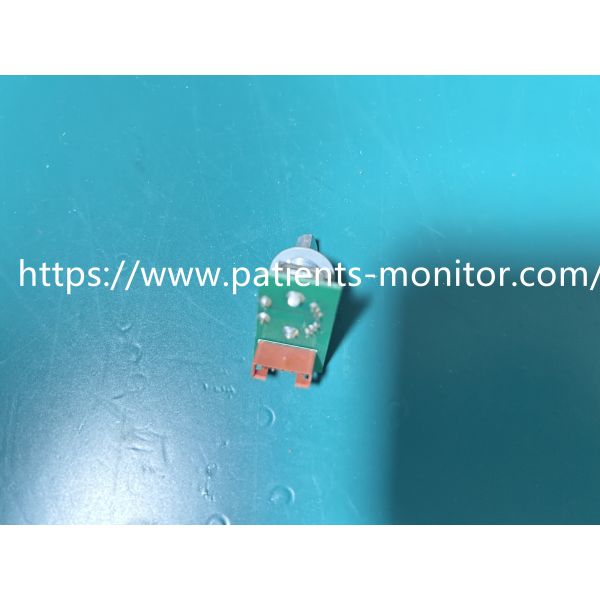
| Product Name | Encoder Rotary Switch |
|---|---|
| Model | MS1R-16760-V1 |
| Material | Metal Shaft + PCB |
| Function | Rotary Navigation & Push Button |
| Installation Method | Screw Fixation |
| Mounting Style | Threaded Nut Mount |
1. Do not rotate forcefully.
Although this encoder is sturdy, it contains delicate pulse contacts. In daily use, rotate it gently; do not twist it like a bottle cap, otherwise you may damage the internal springs or contacts, causing the menu to jump around erratically.
2. Do not press too hard.
Its pressing function is achieved by a microswitch on the PCB
board. Pressing it confirms the menu, but do not poke it hard with
your fingernail. Gentle pressure will extend its lifespan several
times.
3. Keep one in a drawer.
Hospital equipment departments or repair technicians recommend keeping 1-2 on hand. A broken one won't freeze the machine, but it will make operation very difficult. Having one on hand allows for easy replacement and avoids waiting for a replacement, thus preventing delays in clinical use.
1. "No response after turning":
This indicates that the internal pulse contacts are oxidized or open-circuited, and the machine is not receiving a rotation signal.
2. "Turning once and then jumping five times":
Internal contamination and poor contact cause the pulse signal to jump erratically.
3. "No response after pressing":
The internal microswitch is faulty, or the solder joint on the PCB board is broken.
4. "Loose feel":
The nut is not tightened, or the internal spring is faulty, causing the machine to spin freely like a turntable.

|
 Patient Monitor Accessories Goldway UT4000 Monitor Blood Pressure Plate Great Value
Mindray PM7000 Patient Monitor Accessories Keyboard Silicone 7000-20-24395
Well-chosen Patient Monitor Mainboard Goldway G30 40 60 70 80 UT4000B UT6000 Monitor Motherboard
Patient Monitor Repair Parts GE Dash4000 Patient Monitor Flat Cable in ready
5 Leads Patient Monitor Parts Pm 7000 Portable Medical Monitor
V100 Monitor Controller Board , PWB Patient Monitor Accessories
25-250BPM Patient Monitor Parts 14V 3A Blood Pressure Monitor Plate
1024x768 MEC1000 Intellivue Patient Monitor Power Board For Clinic
VM8 Patient Monitor Parts Mainboard
Hospital Medical Equipment PHiliph MP20-MP70 Patient Monitor Repair Parts M3000-60003 Pump
Patient Monitor Accessories Goldway UT4000 Monitor Blood Pressure Plate Great Value
Mindray PM7000 Patient Monitor Accessories Keyboard Silicone 7000-20-24395
Well-chosen Patient Monitor Mainboard Goldway G30 40 60 70 80 UT4000B UT6000 Monitor Motherboard
Patient Monitor Repair Parts GE Dash4000 Patient Monitor Flat Cable in ready
5 Leads Patient Monitor Parts Pm 7000 Portable Medical Monitor
V100 Monitor Controller Board , PWB Patient Monitor Accessories
25-250BPM Patient Monitor Parts 14V 3A Blood Pressure Monitor Plate
1024x768 MEC1000 Intellivue Patient Monitor Power Board For Clinic
VM8 Patient Monitor Parts Mainboard
Hospital Medical Equipment PHiliph MP20-MP70 Patient Monitor Repair Parts M3000-60003 Pump

